InfraCaptain PageSpeed Performance Report
Website speed plays a critical role in user experience, SEO rankings, and overall platform success. This InfraCaptain PageSpeed analysis highlights key performance bottlenecks and actionable recommendations to improve both mobile and desktop performance.
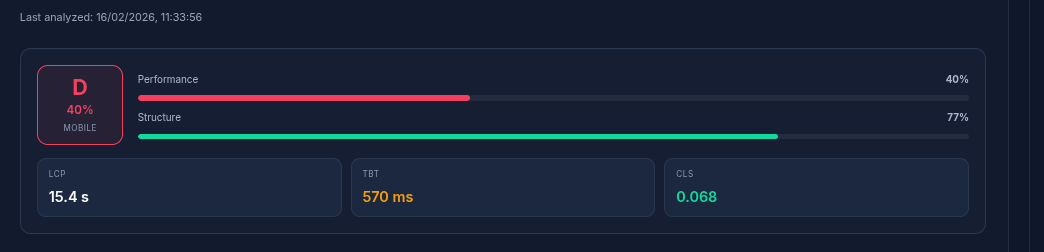
Mobile Performance Overview
InfraCaptain’s mobile performance is currently rated Poor (D) with a score of 40%, indicating major optimization gaps that directly affect user engagement and search visibility.
- Largest Contentful Paint (LCP): 15.4 seconds (Poor)
- Total Blocking Time (TBT): 570 ms (Needs Improvement)
- Total Blocking Time (TBT): 570 ms (Needs Improvement)
The extremely high LCP suggests that users experience significant delays before seeing meaningful content, which negatively impacts both UX and SEO.
Desktop Performance Overview
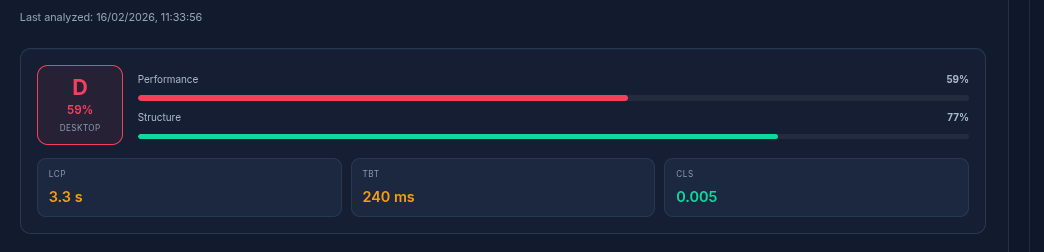
Desktop performance is relatively better but still falls under the D category with a score of 59%, meaning further optimization is necessary.
- LCP: 3.3 seconds (Needs Improvement)
- TBT: 240 ms (Needs Improvement)
- CLS: 0.005 (Good)
Detailed Performance Metrics
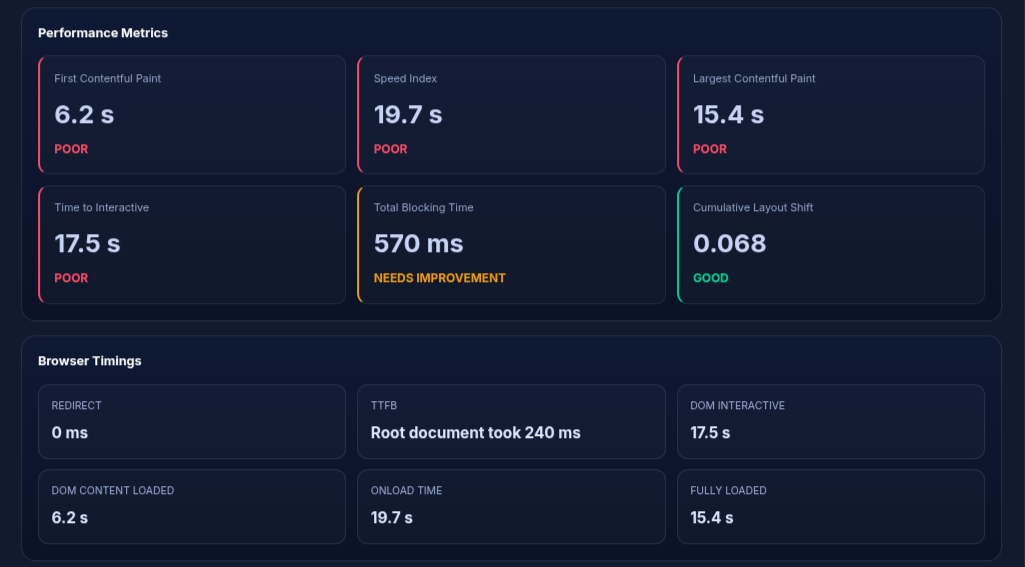
The detailed metrics reveal slow rendering, delayed interactivity, and inefficient resource loading. Key indicators like FCP (6.2s) and TTI (17.5s) highlight serious performance concerns.
SEO & Issue Analysis
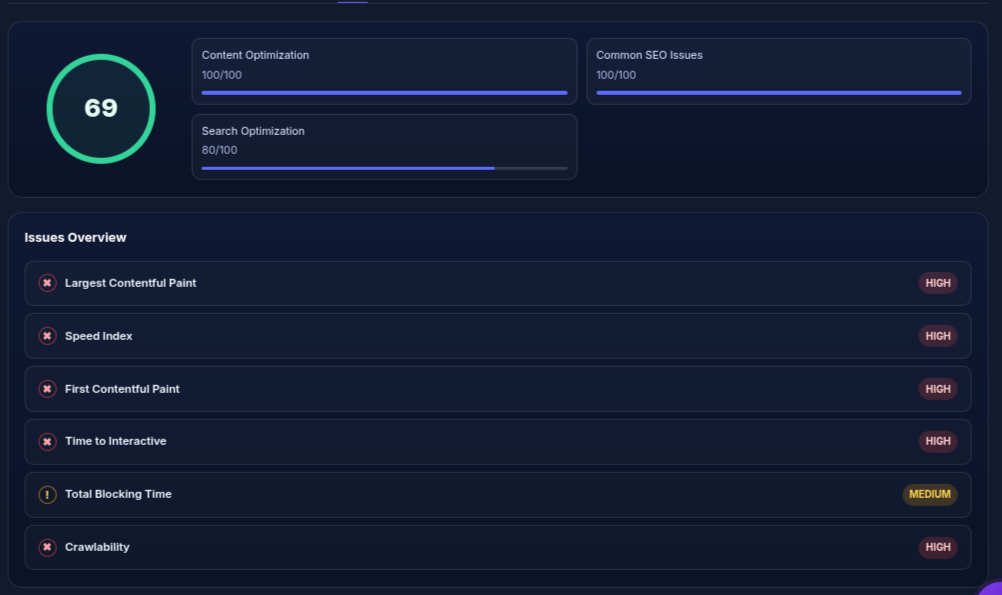
InfraCaptain achieves an SEO score of 69, which is strong in content and technical areas but limited by performance-related issues.
- Content Optimization: 100/100
- Common SEO Issues: 100/100
- Search Optimization: 80/100
Top Performance Issues & Page Load Breakdown
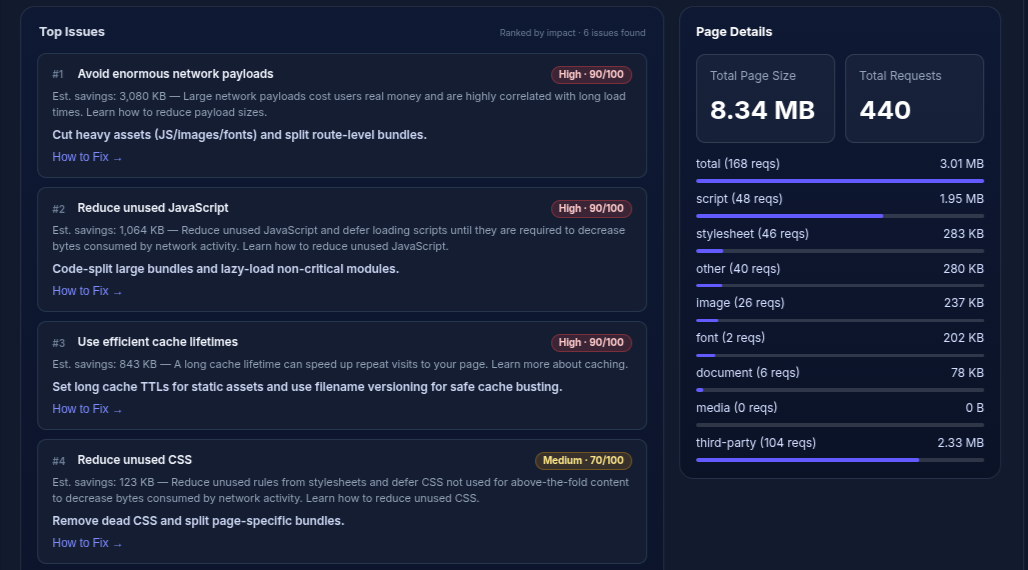
The InfraCaptain PageSpeed analysis highlights critical performance bottlenecks primarily caused by excessive network payloads and heavy third-party resources. The page currently loads a total of 8.34 MB across 440 requests, which significantly impacts loading speed, especially on mobile devices.
- Total Page Size: 8.34 MB
- Total Page Size: 8.34 MB
- JavaScript Size: ~1.95 MB
- Third-party Scripts: ~2.33 MB
- Stylesheets and assets contributing to render delay
A major portion of the load comes from JavaScript and third-party scripts, which directly increase Total Blocking Time and delay interactivity. Reducing these resources will have an immediate positive impact on performance and user experience.
Critical Issues Identified
- Avoid enormous network payloads (High Impact)
- Reduce unused JavaScript (High Impact)
- Use efficient cache lifetimes (High Impact)
- Reduce unused CSS (Medium Impact)
"Large payloads and unoptimized scripts are the biggest contributors to slow loading times and poor Core Web Vitals."
Performance Audit Insights (Lighthouse Analysis)
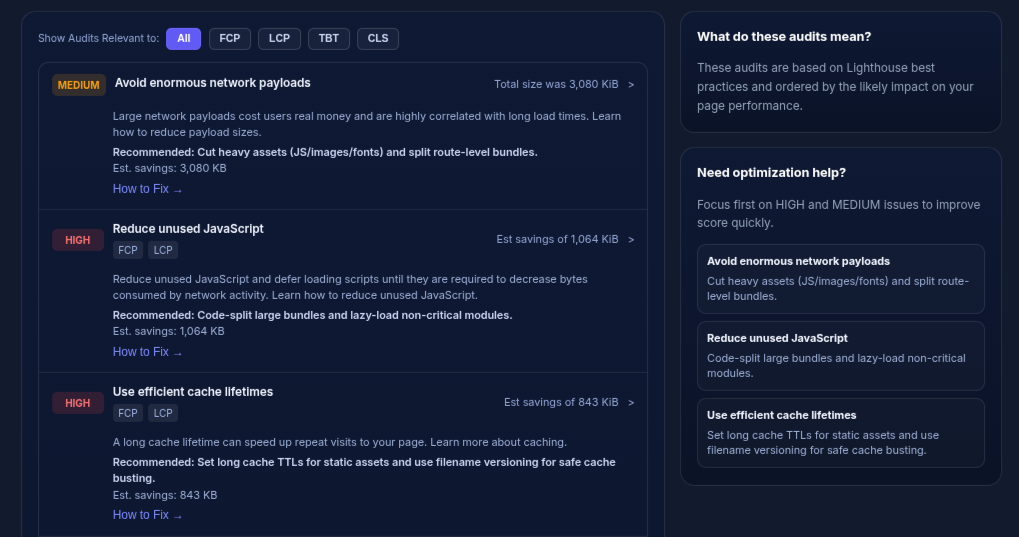
The audit report highlights critical performance bottlenecks that significantly impact loading speed and user experience. These issues are directly tied to poor Core Web Vitals scores, especially on mobile devices.
- Avoid Enormous Network Payloads: Total page size exceeds 3 MB, leading to slow loading times
- Reduce Unused JavaScript: Over 1 MB of unused JS is increasing Total Blocking Time
- Use Efficient Cache Lifetimes: Static assets lack proper caching policies, affecting repeat visits
These issues indicate inefficient resource management, where unnecessary scripts and large assets delay rendering and interactivity. Fixing these can drastically improve LCP, TBT, and overall performance score.
Technology Stack Analysis
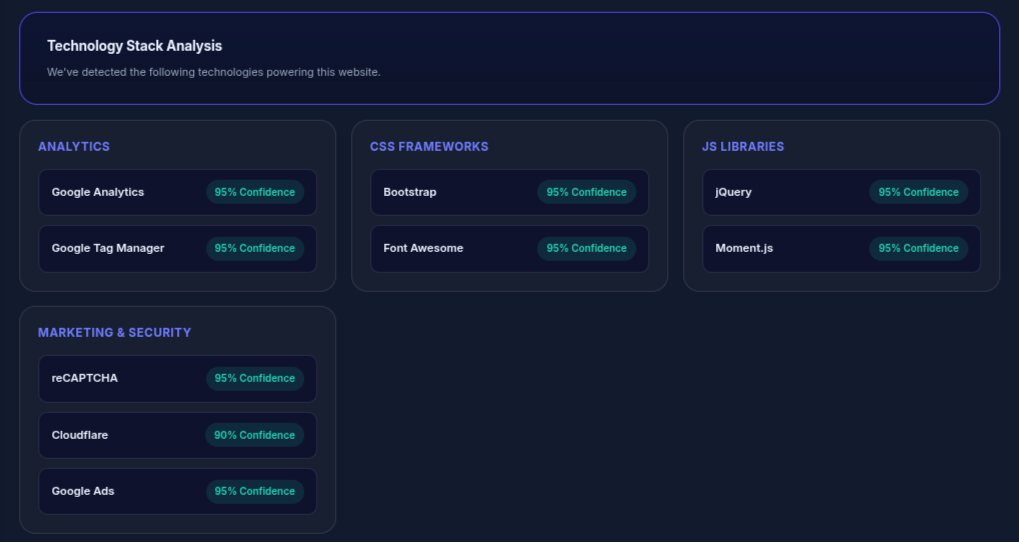
InfraCaptain utilizes a modern but slightly heavy technology stack, which contributes to both functionality and performance overhead.
- Analytics Tools: Google Analytics and Google Tag Manager for tracking
- Frontend Frameworks: Bootstrap and Font Awesome for UI styling
- JavaScript Libraries: jQuery and Moment.js adding additional script weight
- Security & Marketing: Cloudflare, reCAPTCHA, and Google Ads integrations
While these technologies enhance functionality, excessive reliance on third-party scripts increases load time and blocking behavior. Optimizing script delivery and removing unused libraries can significantly improve performance.
"Slow performance metrics like LCP and Speed Index are directly impacting crawlability and search rankings."
Key Issues Identified
- Key Issues Identified
- Render-blocking JavaScript
- Unused CSS and JS
- Inefficient caching strategies
- Poor mobile optimization
Optimization Recommendations
1. Reduce Page Size
Estimated Savings: ~3 MB- Compress images (WebP/AVIF)
- Remove unused assets
- Enable lazy loading
2. Optimize JavaScript
Estimated Savings: ~1 MB- Implement code splitting
- Defer non-critical scripts
- Remove unused libraries
3. Improve Caching
Estimated Savings: ~800 KB- Use long cache lifetimes
- Enable CDN caching
- Apply file versioning
Final Summary
InfraCaptain has a solid structural base but suffers from heavy resource usage and inefficient loading strategies. By focusing on reducing payload size, optimizing scripts, and improving caching, the platform can significantly boost performance, SEO rankings, and user experience.
Need Help with Your Infrastructure?
Get expert assistance with monitoring, DevOps, and infrastructure management.
Contact Us